Good morning. This is a special issue about one company. In four days, OpenAI shipped the two things ChatGPT lacked as a sales channel: a profile your business controls (10 November) and a wallet its AI agents can pay with (13 November). The wallet is small today, US only and for one paid plan. But it works on your existing checkout without asking you first, and the profile is open to stores in the EU now. Here is what each one means, what to do this week, and where the EU line runs.
In today’s brief:
- ChatGPT’s agents can now pay at your checkout
- You can now claim your business in ChatGPT
- EU stores get the profile, not the wallet
- Try this: claim your store and write its profile
The number: ChatGPT has 159.1 million monthly users in the EU, the figure OpenAI reported to the European Commission, and OpenAI says 1.2 billion people use it each week worldwide. On launch day, none of the EU users can pay with ChatGPT Wallet. Source: European Commission.
Payments · lead story
ChatGPT’s agents can now pay at your checkout
 Image source: OpenAI, original announcement.
The brief: On Friday 13 November, OpenAI launched ChatGPT Wallet, built with American Express, Mastercard and Visa. It lets a “dot”, ChatGPT’s always-on agent, pay for a shopper on ordinary websites. It starts with ChatGPT Pro subscribers in the US who have US-issued cards.
The details:
- The shopper adds a card once. Before each purchase they check the items, the total and the card, then approve with Face ID or a fingerprint. The card network issues a payment token, a stand-in card number with its own security code and expiry date, and the agent enters it in your checkout. OpenAI says the real card details aren’t shared “with the business or agent”.
- You don’t integrate anything. OpenAI’s guide says Wallet “works out of the box with existing checkout pages and payment forms”. The agent uses a browser in the cloud and follows your normal checkout. You keep the customer, pricing, fulfilment, returns, customer service and the fraud decision.
- The weak spot is your own defences. Bot protection and fraud tools are built to stop automated orders, and OpenAI says “some sites may unintentionally block purchases”. Akamai, Cloudflare, HUMAN and Vercel verify ChatGPT’s signed requests automatically. OpenAI also says it is working with Forter, Riskified, Sardine, Signifyd, Adyen, Checkout.com and Stripe so their systems recognise these orders, and it is starting to pass the shopper’s country, time zone and network to your site in a
Forwardedheader. - Each token is for one approved purchase. “Don’t reuse or save that payment credential for a separate purchase.” Subscriptions work if the shopper agreed to the recurring terms. Every purchase arrives with a different card number, so if you match customers or refunds by card, OpenAI points to the Payment Account Reference (PAR) instead.
- None of the Wallet pages names a merchant fee, and OpenAI’s merchant page says “There are no fees on purchases that start in ChatGPT.” Order problems come to you, “in the same way you would if a customer took the action themselves”.
- Later, OpenAI expects shoppers to pre-approve purchases within spending limits, categories or time periods. No date.
Why it matters for your store: OpenAI says it is “moving away from a standalone Instant Checkout” inside ChatGPT. Instead of a special checkout that stores had to sign up for, the agent now buys on the checkout you already have. That cuts both ways. You get these orders without building anything. And you can lose them without noticing, because your firewall turned the agent away or your fraud tool declined the payment. The audience is small today, but the fixes sit with the same CDN, payment and fraud providers that every other shopping agent will go through.
Your move · TEST: Ask two questions this week. To whoever runs your CDN or firewall: do we allow verified ChatGPT browser visits (Web Bot Auth), or do our bot rules block them? To your payment or fraud provider: how do you treat orders paid with a network token from ChatGPT's agent, and do you read the Forwarded header? If you sell to US shoppers, ask before Black Friday.
Evidence: OpenAI announcement, Commerce Partner Playbook and help center, 13 November.
Discovery · ChatGPT
You can now claim your business in ChatGPT
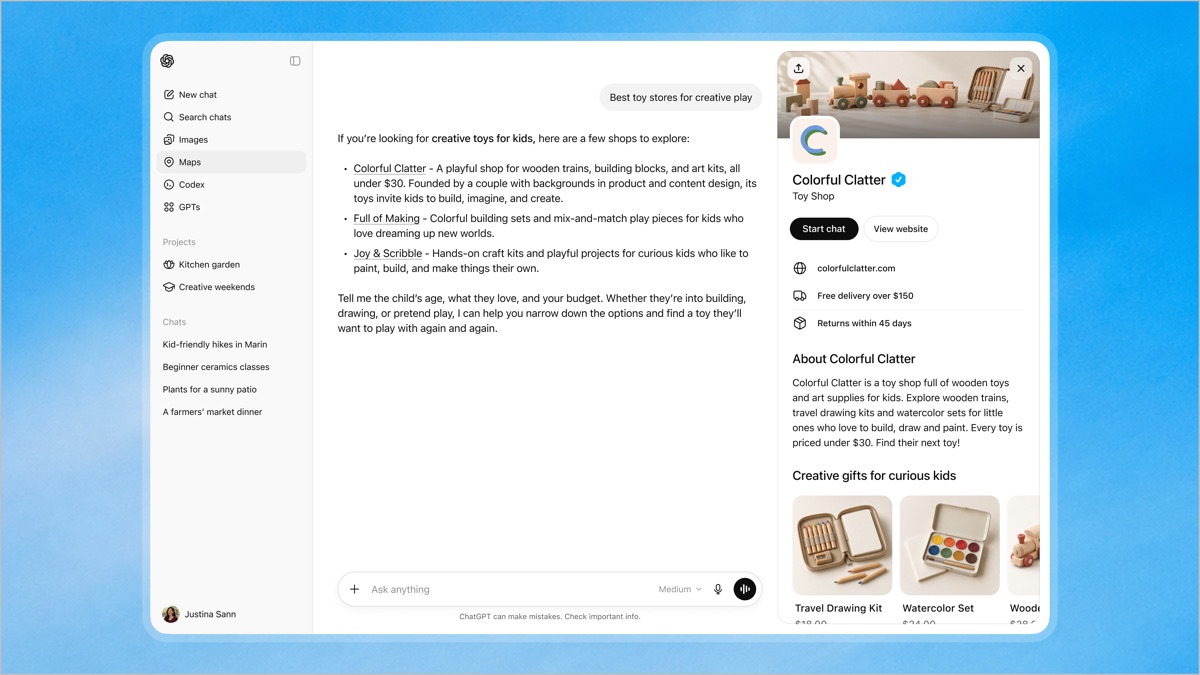 Image source: OpenAI, original announcement. Colorful Clatter is OpenAI’s demo business.
The brief: On 10 November, OpenAI launched Businesses in ChatGPT in beta. In Business Hub you claim your business, correct its details, upload a product feed and see how often ChatGPT mentions you. OpenAI names no fee, and you don’t need an ads account or an enterprise contract.
The details:
- Claim, then verify twice. First prove the link to the business by business phone, business email, a DNS record on your domain or your Shopify store. Then pass an identity check with Persona, which may ask for a government ID, business registration and proof you’re authorised. Until Persona approves you, you can’t publish changes, connect a feed or see insights. The blue check appears after that approval.
- You control the website, description, category, logo, cover photo, delivery policy and return policy, plus a product feed with prices and availability (CSV upload, a hosted URL or SFTP). Shopify and Etsy catalogs are already in ChatGPT.
- Insights cover the past 28 days: mentions, website clicks and “discovery topics”, the themes of answers that cited you. A mention only counts when ChatGPT references your website. The brand name alone doesn’t count, and a blank metric doesn’t mean zero. You never see individual prompts or conversations.
- Business Agents are the US-only part: an AI rep that answers shoppers in a separate, labelled chat from your product and policy information. It can’t take orders. It links to your site, and you can make it the destination of a ChatGPT ad.
- The limits: “Claiming does not guarantee higher placement or sales.” ChatGPT may still use other sources, OpenAI reviews every change, and its support can’t delete or hide a published profile.
Why it matters for your store: This is ChatGPT’s version of a Google Business Profile, and the first time OpenAI itself tells you how often you show up. Until now you had referral traffic and third-party estimates. The profile is also where a shopper lands when they click your name in an answer, and the delivery and return fields are the lines an agent reads before it buys.
Your move · ACT: Claim your business this week (the Try this below takes 10 minutes). Start the Persona check the same day: insights and the feed stay locked until it's approved, and OpenAI doesn't say how long review takes.
Evidence: OpenAI announcement, Businesses in ChatGPT policy and help center, 10 to 11 November.
Europe · what works where
EU stores get the profile, not the wallet
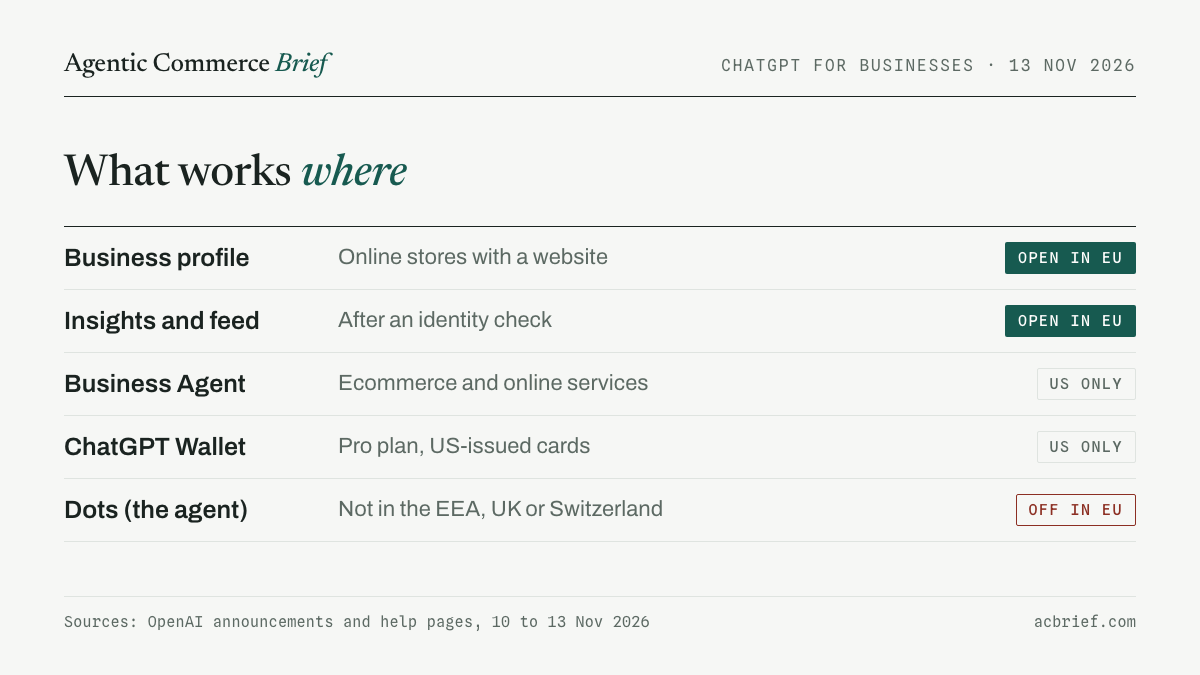
The brief: OpenAI says any eligible online business “located where ChatGPT is available” can claim its profile, and that includes the EU. Everything that moves money stops at the border. Wallet needs a US-issued card and a US billing address. And the agent that uses it isn’t offered in Europe at all: dots are rolling out to Pro users in “markets excluding the European Economic Area, Switzerland, and the UK”. OpenAI gives no reason and no date.
Why it matters for your store: Four things, if you sell from the EU.
- You may still get these orders. Nothing in OpenAI’s pages limits which stores an agent can buy from. If you ship to the US, I’d expect a US subscriber’s agent to reach your checkout like any other, so the lead story’s two questions apply to you too.
- The payment rails are already here. Mastercard said in June that all its issuers in Europe are enabled for its agent payments at network level, and it names 36 banks in its Europe region that completed controlled test purchases, authenticated with passkeys. Visa said in July it is working with over 30 European issuers. Both sell these products. What is missing in Europe is the agent, not the card network.
- The rules aren’t settled. EU payment law requires strong customer authentication when a shopper pays, and EU regulators haven’t yet said how that rule applies when an agent pays for them. The European Banking Authority plans to start “new targeted analysis of the use of Agentic AI in payments” in 2027. Wallet’s design, a biometric approval for every purchase, looks built for that kind of rule, but OpenAI hasn’t said so.
- ChatGPT is now regulated here as a search engine. The European Commission designated it a very large online search engine on 31 August, with the extra Digital Services Act duties due by January 2027. In general those include assessing the risks of its algorithms and keeping a public ad repository. The Commission hasn’t said how they apply to which businesses ChatGPT recommends.
One open point: OpenAI’s merchant page still says “Shopping is currently live in the U.S.”, so I can’t confirm that EU shoppers see products from a feed you upload.
Your move · ACT (EU stores): Claim the profile now and fill in delivery and returns, because that part is open to you and ChatGPT already answers 159.1 million people here. Treat Wallet as WATCH, unless you ship to the US.
Evidence: OpenAI help center, 11 to 13 November; European Commission, 31 August and 6 November; Mastercard, 2 June; Visa, 2 July; European Banking Authority work programme, September.
Shelf watch · ChatGPT edition
Where each piece stands this week
- Business profile · NEW: claim and edit in Business Hub. Open to eligible online businesses with a website wherever ChatGPT is offered. Local shops and restaurants “can currently claim only an existing U.S. listing”.
- Insights · NEW: mentions, website clicks and discovery topics for 28 days, after the Persona identity check.
- Product feed · CHANGED: now self-service in Business Hub, where you choose the countries and currencies you sell in. Shopping results are still described as US only.
- Business Agents · NEW, US ONLY: for eligible ecommerce and online service businesses. They answer questions and link to your site. They can’t complete a purchase.
- ChatGPT Wallet · NEW, US ONLY: Pro subscribers aged 18 and over, with eligible US-issued American Express, Chase, Mastercard and Visa cards.
- Dots · NOT IN EUROPE: the agents that use Wallet aren’t offered to Pro users in the EEA, the UK or Switzerland.
- Ads · STEADY: self-service ChatGPT ads are available in all 27 EU countries, plus the UK, Switzerland, Norway and Iceland.
Try this · 10 minutes
Claim your store and write its profile
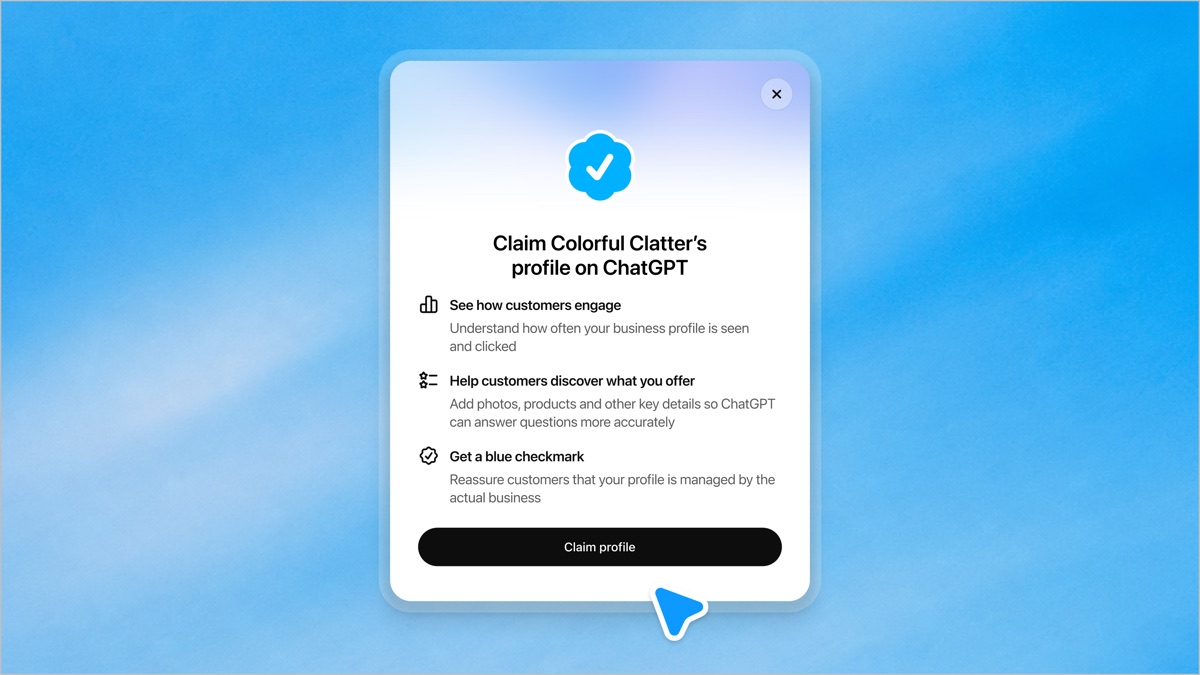 Image source: OpenAI, original announcement.
The claim takes minutes. The reviews take longer, so start them now and write the profile while you wait.
- Sign in to ChatGPT, open Business Hub from the sidebar (or go to chatgpt.com/business-hub) and search for your business by name. If it isn’t listed and you run an online business, look for the option to add it.
- Choose a verification method. For a store, the website domain (a TXT record in your DNS settings) or your Shopify store is the most direct. Then wait for OpenAI’s email.
- Start “Verify with Persona” straight away. Have a government ID and your business registration ready, and make sure the business name, address and registration or tax number match your official records.
- While you wait, run the prompt below on your About, shipping and returns pages. Paste the result into your profile once you’re approved, and fix on your site whatever it flags.
Prompt: Below are my store's About page, shipping page and returns page. Write three things for my business profile in ChatGPT. One: a business description of 60 words or fewer that says what we sell, for whom and in what price range, in plain words with no slogans. Two: a one-line delivery policy with the cost, the free-shipping threshold, the countries we ship to and the delivery time. Three: a one-line return policy with the return window, who pays for the return and any exceptions. Use only facts from the text. If a fact is missing, or two pages contradict each other, don't guess: list it under "Fix on the site first". About page: [paste] Shipping page: [paste] Returns page: [paste]
Tool radar
Three tools, three verdicts
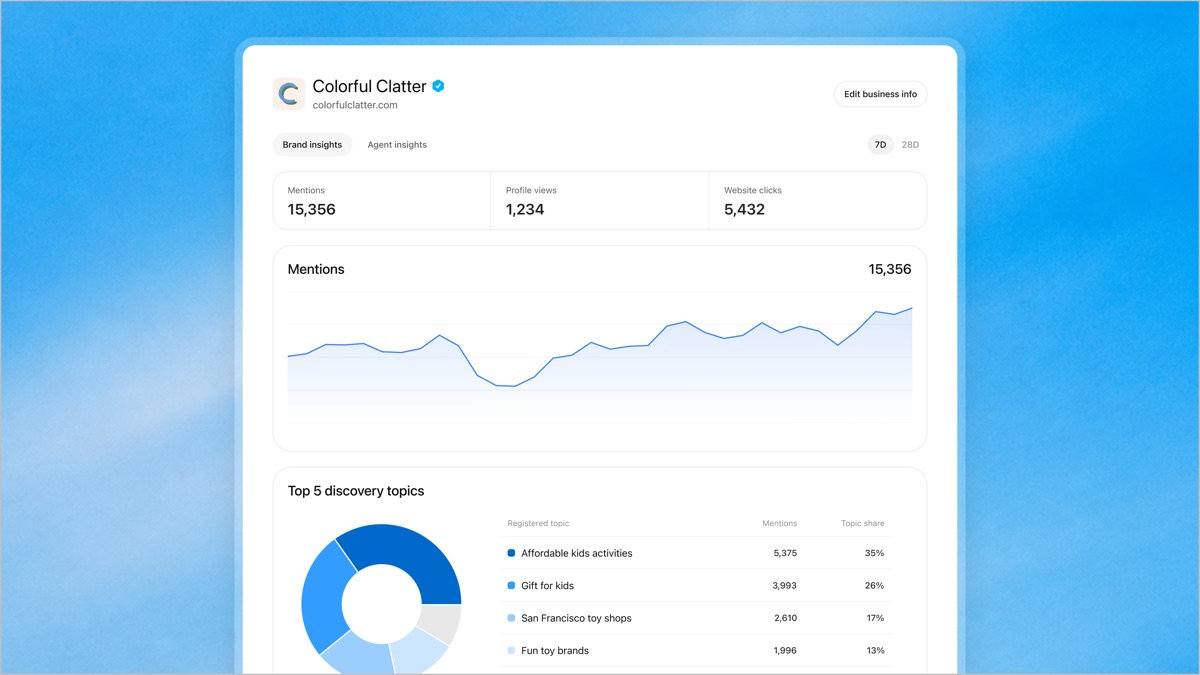 Image source: OpenAI, original announcement. Sample data.
- USE · Business Hub insights: OpenAI’s own count of your mentions and website clicks, with the topics behind them. Read it with two caveats in mind: a mention needs a reference to your website, and small numbers are hidden until they pass a threshold. Compare it with the ChatGPT referrals in your analytics.
- TEST · A product feed in Business Hub: if you’re not on Shopify or Etsy, upload a feed for your 20 best sellers first and watch whether prices and stock in answers get more accurate. OpenAI says a feed doesn’t “guarantee that ChatGPT recommends your products”. Shopify and Etsy stores are already in.
- SKIP · Building a ChatGPT plugin, for now: a plugin lets agents check stock and manage carts through your own systems, but OpenAI says it “takes more integration work” and that the agent’s browser can already use your site. Its merchant page calls apps “best suited for larger merchants”. Fix agent access and the feed first.
Quick hits
The fine print
- You can’t set your own rules for the agent. OpenAI says site owners can’t yet control which actions an agent takes on their site, but that it requires “human review before any consequential action” for all users. OpenAI’s agent access guide.
- Agencies can be given access. The admin who claimed a business can add teammates and grant an agency access to manage the profile or its agent. Each brand is managed separately, and there’s no central view across brands yet. OpenAI’s setup guide.
- Wallet won’t work everywhere. OpenAI tells shoppers that Wallet “may not be able to complete checkout at every store”, and to check for an order confirmation before they try again. I’d expect some duplicate or abandoned orders while this settles. OpenAI’s Wallet help page.
- Business Agents have selling rules. They may not create false urgency, keep pushing after a shopper declines, or submit a purchase without explicit authorisation. OpenAI can pause or remove an agent that breaks them. Business Agents Policy.
Before you go
Are you in the EU, and did your claim go through? Reply with your country and the verification method that worked. I’ll share the tally in the next brief, anonymously.
New here? Score your store with our free AI Shelf Checklist. Know someone who runs an online store? Forward them this email. They can subscribe free at acbrief.com.